
Actions
Operator-defined remote commands triggered over APRS
An Action turns a specially-formatted APRS message
into a local command or webhook call. You define the Action in the
web UI, hand out a one-time-password (OTP) credential to whoever is
allowed to fire it, and from then on a packet of the form
@@123456#unlock coming over the air can run a script,
hit a webhook, flip a relay, or whatever else you wire up. Every
attempt — successful, denied, malformed — is logged, and
the result is replied to the sender on the same band the request
arrived on.
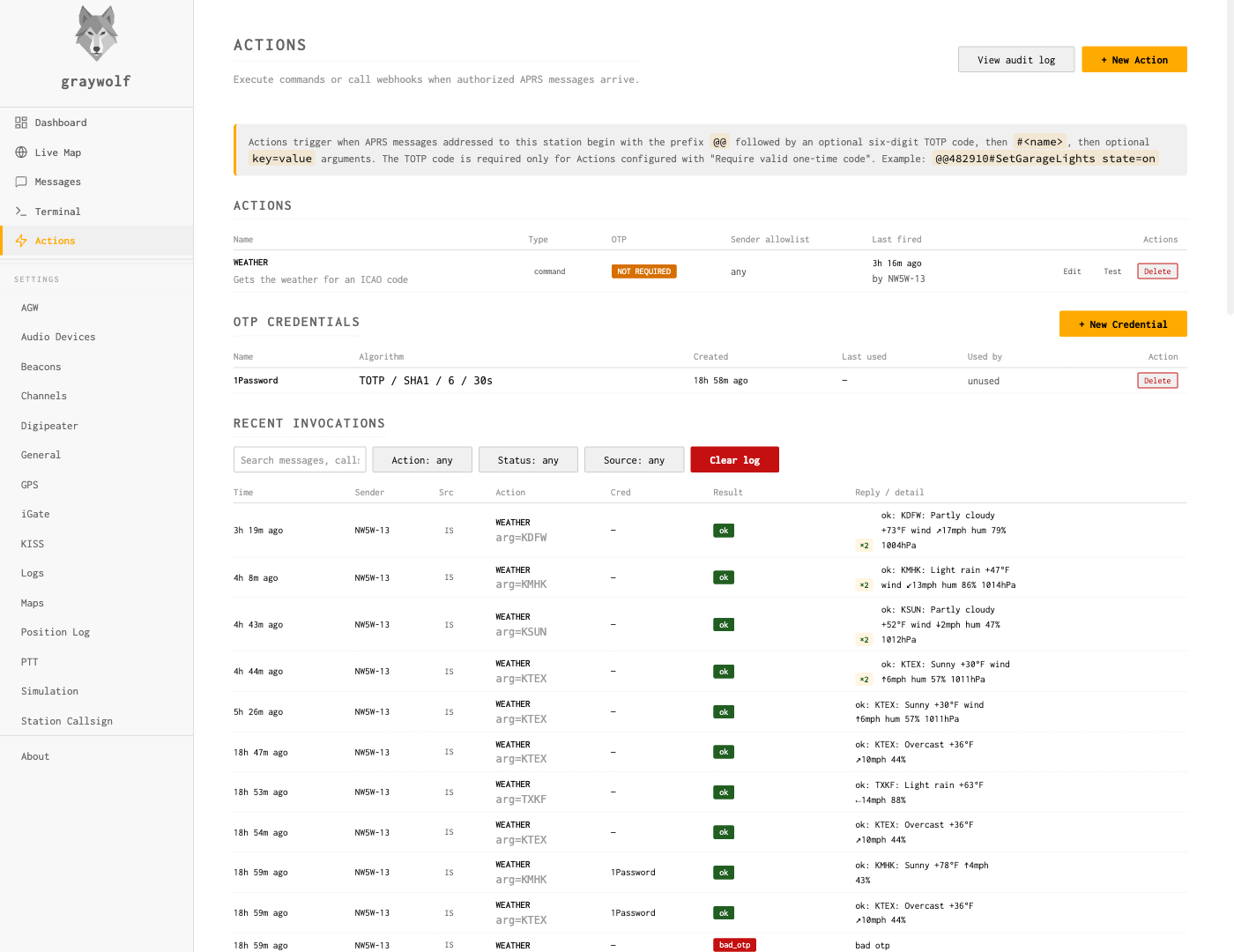
Actions live on the Actions page in the sidebar. Three sections share the page: a list of defined Actions, a list of OTP credentials, and a live tail of recent invocations.
Message grammar
Graywolf treats an inbound APRS text message as an Action invocation when both are true:
- The message is addressed to your station — either your primary callsign, an enabled tactical alias, or an additional listener addressee you have defined for Actions.
-
The message body begins with
@@.
The body grammar is:
@@<otp>#<action> [k=v ...]-
@@is the sentinel that separates Actions traffic from normal messages. Without it, the inbound goes to your Messaging inbox unchanged. -
<otp>is six ASCII digits when the Action requires OTP, or empty when it does not. The Action’s Require OTP toggle is what decides. -
<action>is the Action’s name, 1–32 characters of[A-Za-z0-9._-]. Names are case-insensitive on the wire and stored uppercase — senders may type any case, and the$GW_ACTION_NAME/argv[0]values that reach your script always arrive uppercase. -
[k=v ...]are zero or more space-separated key=value tokens, validated against the Action’s argument schema.
Examples
# An OTP-protected Action with no args:
@@482103#unlock

# Same Action, with a key=value arg:
@@482103#unlock door=garage

# Public Action that does not require OTP:
@@#status

# Public Action with two args:
@@#bulb room=kitchen state=on
The Actions page carries a help banner at the
top with a worked example of the wire grammar
(@@482910#SetGarageLights state=on), so you can
verify the shape without referring back to this page.
Argument mode: kv vs freeform
Each Action has an argument mode that decides how the part of the wire body after the verb is parsed:
-
kv(default) — the rest of the body is split into space-separatedkey=valuetokens, each validated against the Action’s argument schema. Use this when an Action has multiple structured fields. -
freeform— everything after the action name is one untokenized payload, validated against a single-row schema. Use this when the natural form of the input is one chunk of text (an SMS body, a notification body, a message-to-be-spoken).
# kv mode (default):
@@482103#sms to=+15555551212 msg="hello there"

# freeform mode:
@@482103#sms +15555551212 hello there
Freeform shifts more responsibility to the handler — the operator parses and revalidates the payload inside the script or receiver. The handler safety guide walks through both modes with worked examples and is required reading before deploying a freeform Action.
Defining an Action
Click + New Action at the top of the Actions table. The modal that opens covers every field of the Action in one form; the form is type-aware, so the lower half changes shape depending on whether you pick command or webhook.
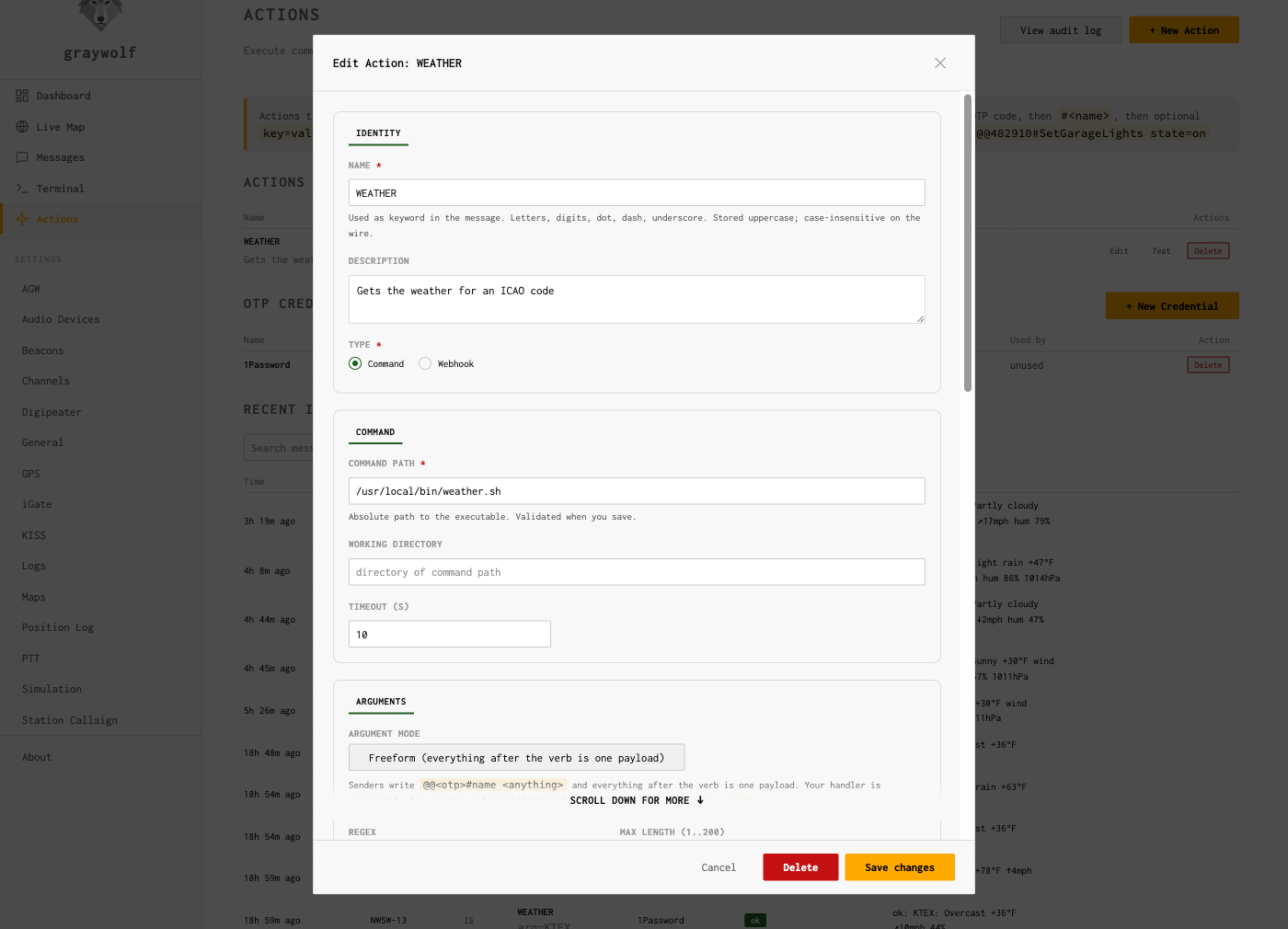
Common fields:
-
Name. 1–32 characters, the token that goes
after
#in the wire grammar. Case-insensitive on the wire, stored uppercase. Must be unique across your Actions (case-insensitive uniqueness —UnlockandUNLOCKcollide). - Description. Free-form, shown in the Actions table and in the Test dialog. Operator-facing only.
-
Type.
commandorwebhook. See the type-specific blocks below. -
Enabled. Off-switch without deleting. A disabled
Action replies
disabledto any inbound rather than running. -
Require OTP. When on, the wire body
must include a six-digit code that validates
against the assigned OTP credential. When off, the
<otp>slot in the message is empty. - OTP credential. Required when Require OTP is on. Pick from the credentials in the lower table on the Actions page; if you have not created any yet, do that first (next section).
-
Sender allowlist. Comma-separated callsigns.
When set, only these callsigns may fire the Action. Tokens may
be exact matches like
NW5W-7, orBASE-*wildcards that match the bare base call and any SSID under it — e.g.NW5W-*matchesNW5W,NW5W-7,NW5W-9, and so on. Useful when one operator roams between mobile, HT, and home stations under different SSIDs. APRS callsigns are spoofable, so treat this as defense-in-depth on top of OTP, not a replacement for it. Leave it empty to allow any callsign that knows the OTP. -
Timeout (sec). Hard ceiling on how long the
command or webhook may run before graywolf cancels it. Default
10 seconds. After the cancel, the executor sends
SIGTERMto a command and waits up to two more seconds beforeSIGKILL. -
Queue depth. Per-Action FIFO that absorbs
inbounds while a previous invocation is still running. Default
8; an inbound that arrives once the queue is full replies
busy. Set the depth to 0 to allow parallel runs (only safe for read-only commands). -
Rate limit (sec). Minimum gap between successful
invocations. Default 5 seconds. An inbound inside the window
replies
rate_limited. -
Argument mode. A radio between
kv(default) andfreeform. In freeform mode the multi-row schema editor collapses to a single-row editor for the lone payload field, since the whole post-verb body becomes one value. Switching to freeform requires reading the handler safety guide first — the operator (you) becomes responsible for splitting and revalidating the payload inside the handler. -
Argument schema. A list of
{key, regex, required}rows. Every key/value token on the wire must match a row in the schema, and the value must match the row’s regex. Required keys missing from the wire replybad_arg: <key>. Empty schema means no args accepted. In freeform mode the editor shows a single row whose key is fixed toarg.
Command Actions
A command Action runs an executable on the graywolf host. Specific fields:
- Command path. Absolute path to the executable. Graywolf does not shell out — the binary is invoked argv-style, so quoting and shell metacharacters in argument values are inert. If you need a shell pipeline, write a script and point the command path at it.
- Working directory. Optional. Defaults to the directory containing the command path.
Execution environment
Each invocation runs as the graywolf service user.
Graywolf passes the inbound metadata two ways:
argv (in this order):
argv[0]— the binary itselfargv[1]— action nameargv[2]— sender callsignargv[3]—trueorfalse(whether OTP was verified)-
argv[4]onwards — one literalkey=valuetoken per argument, in the order they appeared on the wire
Environment variables:
| Variable | Value |
|---|---|
GW_ACTION_NAME | the Action’s name |
GW_SENDER_CALL | callsign that sent the inbound |
GW_OTP_VERIFIED | true / false |
GW_OTP_CRED_NAME | name of the OTP credential used (or empty) |
GW_SOURCE | rf or is |
GW_INVOCATION_ID | numeric ID of the audit row for this invocation |
GW_ARG_<KEY> | one variable per arg; key uppercased, non-alphanumerics replaced with _ |
PATH | /usr/local/sbin:/usr/local/bin:/usr/sbin:/usr/bin:/sbin:/bin |
The script’s exit code 0 is success;
anything else replies error: exit N. Stdout and
stderr are merged and captured up to 4 KiB; the first ~50
characters of the captured output are echoed in the on-air reply
as ok: .... The full capture lives in the audit row.
Are my scripts safe from injection?
Short answer: yes, by default, and you don’t need to do anything special to keep it that way. The longer answer is worth understanding so you don’t accidentally undo it in your own script.
A classic worry is “what if someone sends me an arg like
foo;rm -rf /?” Two things stop that
from being dangerous:
- Graywolf never runs your command through a shell. Your script is invoked directly with each argument handed to it as a separate parameter. There is no shell parsing the arguments in between, so semicolons, pipes, redirects, backticks, dollar signs, and the rest of the shell metacharacter set are inert — they arrive at your script as ordinary bytes inside one single argument string.
-
The default arg regex rejects them anyway.
Out of the box, every
k=vvalue must match[A-Za-z0-9,_-]{1,32}. Spaces, slashes, semicolons, and quotes never make it past the parser — the inbound repliesbad_arg: <key>and your script never runs. You can widen the regex per-argument in the schema editor when you have a real need (filenames, URLs), but the default is deliberately tight.
The one way to undo all of this is to write a script that
hands its arguments back to a shell yourself. Anything
that builds a command line from $1 / $2
/ $GW_ARG_* and runs it through eval,
bash -c, sh -c, or
os.system() reintroduces the shell that graywolf
worked hard to keep out. So:
# DANGEROUS — this re-introduces the shell:
bash -c "do-thing $1"

# SAFE — quote the variable, or use it directly as an argv slot:
do-thing "$1"
do-thing -- "$GW_ARG_ROOM"
The same rule applies in any language: pass arguments as separate
list items to the next process you invoke (e.g. Python’s
subprocess.run([...]) as a list, not as a single
string), and keep the value out of any text that you
eval, format, or otherwise reparse.
As long as your script doesn’t go out of its way to glue
arguments back into a shell command, the layered defenses
— argv-only execution, the default regex, the per-Action
rate limit, OTP, and the audit log — combine into a safe
remote-control surface.
Webhook Actions
A webhook Action issues an HTTP request when fired. Specific fields:
- URL. The endpoint. Token expansion (see below) runs on the URL before the request goes out, with values URL-encoded.
-
Method.
GETorPOST. - Headers. Optional key/value list. Header values are token-expanded literally (no encoding).
-
Body template. Optional,
POSTonly. When present, the literal body is the template with tokens expanded (no encoding). When absent, graywolf sends a default form-encoded body (application/x-www-form-urlencoded) with one field per metadata item plus one field per argument.
Tokens
The URL, header values, and body template can reference invocation
metadata using {{name}} tokens. Tokens are
substituted in a single pass — substituted text is never
reconsidered, so an arg value containing
{{action}} cannot leak through to a second
expansion.
| Token | Value |
|---|---|
{{action}} | action name |
{{sender-callsign}} | sender’s callsign |
{{otp-verified}} | true / false |
{{otp-cred}} | OTP credential name (or empty) |
{{source}} | rf or is |
{{arg.<key>}} | value of the named arg |
Examples:
# URL-template; values get URL-encoded:
https://hass.local:8123/api/services/light/turn_on?room={{arg.room}}

# JSON body template; values are inserted literally:
{"action":"{{action}}","sender":"{{sender-callsign}}","room":"{{arg.room}}"}
An HTTP 2xx response is success; anything else
replies error: http NNN. The first 1 KiB of the
response body is captured for the audit row; the first ~50
characters appear in the on-air reply.
Webhook requests do not follow redirects. A
3xx response surfaces as error: http 3NN
and the redirect target is not chased. This is deliberate —
a remote attacker who can influence webhook URLs (or persuade
your endpoint to issue a redirect) cannot pivot the request
against an internal address through your station.
Creating an OTP credential
An OTP credential is a TOTP secret (the same kind your bank or
GitHub generates 6-digit codes against), with a friendly name.
You attach the credential to one or more Actions, and the codes
it produces become the <otp> in the wire
grammar.
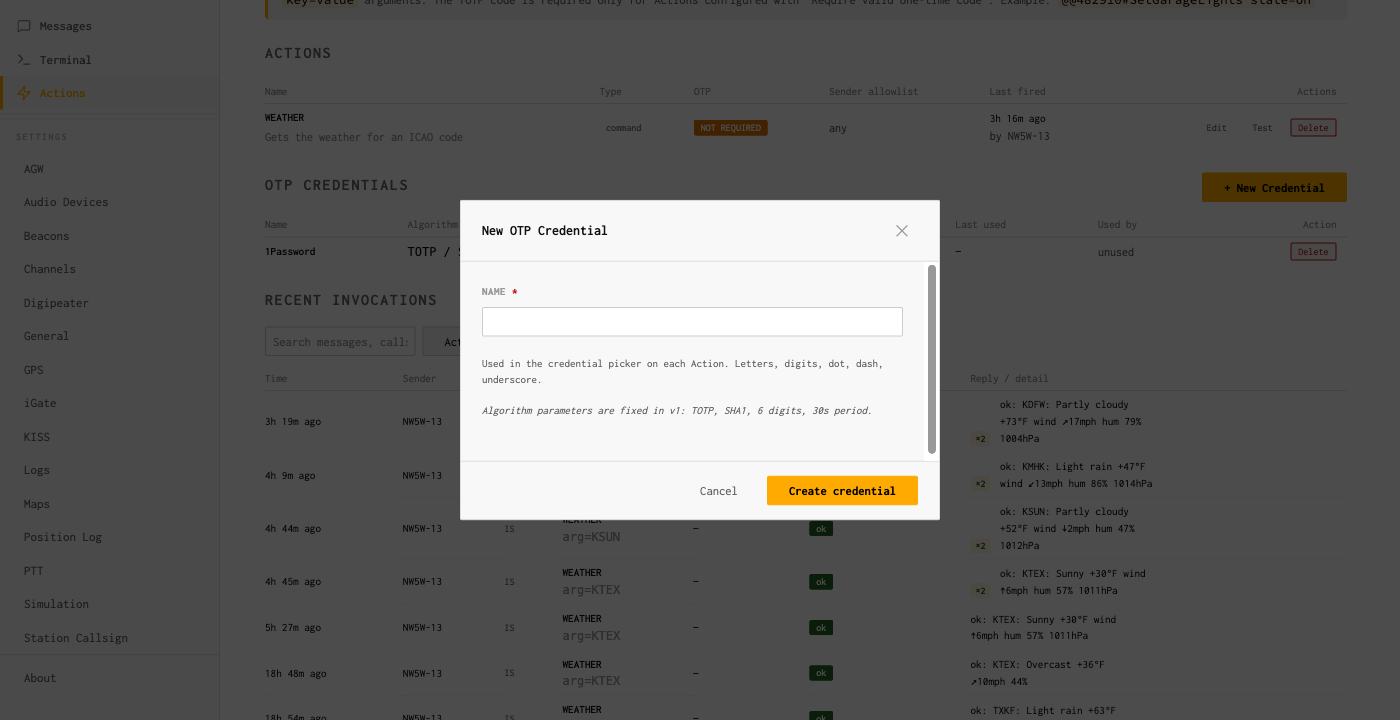
Click + New Credential on the Actions page,
give it a descriptive name (e.g. field-laptop,
repeater-tech), and click Create.
Graywolf generates a fresh secret server-side and returns the
one-time reveal panel:
The reveal panel shows the secret only once. After you close it, graywolf retains only what it needs to verify codes — the secret itself is gone for good. Save it immediately:
- Scan the QR code with an authenticator app (see the next section), or
- Copy the Secret Key shown on the right and type/paste it into your authenticator manually.
Click I’ve saved it to dismiss the panel. Once dismissed the secret is unreadable from the UI — it is stored only as the verification material that graywolf needs to check 6-digit codes. If you lose the device, delete the credential and create a new one.
Single-station design. All credentials use
graywolf as the issuer and your station callsign as
the account label inside the authenticator app. The UI does not
expose the issuer/account fields because graywolf is a
single-operator station.
Want to let another graywolf fire these? Copy the Secret Key shown in the reveal panel and send it (over a trusted side channel) to the operator at the other graywolf — the one who wants to fire this Action remotely. They paste it into their Messages → Remote Actions drawer (Manage One-Time Passwords→ New Secret → Secret Key). Same string, two sides. See Remote Actions.
Authenticator apps
Any standard TOTP authenticator works. The QR code in the reveal
panel encodes the standard otpauth:// URI, and the
Secret Key is plain RFC 4648 base32.
- Google Authenticator — tap + → Scan a QR code, point the camera at the panel, done. Or + → Enter a setup key and paste the Secret Key.
- Authy — Add Account → Scan QR Code, or Enter Code Manually and paste the Secret Key. Authy backs the account up to its cloud; if you do not want that, prefer Google Authenticator or 1Password.
- 1Password — create a new login item, add a One-Time Password field, click the QR icon and use either the camera or paste the URL/secret. 1Password syncs across devices through your vault, which is convenient if you operate from multiple radios.
- Bitwarden, KeePassXC, etc. — any TOTP-aware password manager works the same way; either scan the QR or paste the Secret Key.
A code is valid for 30 seconds (the standard TOTP step), and
graywolf accepts the code from the previous and next step too,
giving each code a roughly 90-second window of validity. Once a
code has been used successfully, an in-memory replay ring rejects
that exact (credential, step, code) tuple for the
remainder of its window, so a sniffed RF code cannot be replayed
by a third party.
Sender allowlist and rate limits
Two soft layers sit on top of OTP:
-
Sender allowlist. When set, the sender’s
callsign must match one of the listed callsigns or the inbound
replies
denied. The allowlist is checked before the OTP is probed, so a denied sender cannot use timing or replies to test whether a code is valid. -
Rate limit. One successful invocation per
rate_limit_secwindow per Action, default 5 seconds. An inbound inside the window repliesrate_limited. The window is per-Action, so two different Actions do not share a single budget.
Both are tunable per Action. APRS callsigns are spoofable, so treat the allowlist as defense in depth on top of OTP, not as a standalone gate.
Reply format
Every invocation produces an APRS reply on the band the request arrived on:
- Inbound over RF → reply via RF first, with APRS-IS as backup if RF cannot deliver.
- Inbound over APRS-IS → reply via APRS-IS only (the sender obviously has internet reach; RF is not guaranteed).
The first word of the reply is always one of these status tokens:
| Status | Meaning |
|---|---|
ok | command exit 0 / HTTP 2xx; first ~50 chars of output follow after a colon |
unknown | parse failure or no Action by that name |
denied | sender not in the allowlist |
no_credential | Action requires OTP but the assigned credential is missing or was deleted |
bad_otp / bad_otp: missing / bad_otp: replay / bad_otp: verify | OTP wrong, empty when required, replayed within the ring window, or verifier rejection |
bad_arg: <key> | argument failed the schema; first offending key reported |
disabled | Action exists but is toggled off |
busy | per-Action queue full |
rate_limited | within the rate-limit window of the previous invocation |
timeout | command/webhook exceeded its timeout |
error: ... | command non-zero exit, HTTP non-2xx, or transport failure |
The hard ceiling on the reply is the APRS message cap (~67 bytes). When the captured output exceeds the budget, graywolf truncates and flags the reply with a trailing ellipsis — the full capture remains in the audit log.
Multi-line replies
Each Action carries a Max reply lines setting
(defaults to 1, hard ceiling 5). Leave it at 1 and the on-air
reply is the single legacy frame described above. Raise it and
stdout lines 2..N each ride an additional APRS message, capped
at 67 runes per line; the ok: prefix only rides
the first frame. Lines past the cap are silently dropped and
Truncated is set on the audit row.
Airtime cost is real. Every extra line is one
more RF frame plus its own ack and retries on a shared channel.
An Action set to 5 turns one trigger into five outbound frames
back-to-back, which is antisocial on 144.39 even if it works.
Reach for multi-line only when the operator genuinely needs
structured output (a multi-field weather summary, a short
status block); single-line is the right default for almost
every Action. Failure replies (denied,
bad_arg, timeout, etc.) always
collapse to one frame regardless of the setting.
Audit log
Every attempt — successful, denied, malformed, rate-limited — produces an audit row, surfaced as the Recent Invocations panel at the bottom of the Actions page. Filters at the top of the panel narrow by Action name, sender callsign, status, and time range; the panel live-polls every five seconds.
Each row records:
- Action name (denormalized so deleted Actions still read sensibly)
- Sender callsign and source (
rforis) - OTP verification status and credential name used
- Parsed args (kv values capped at 64 characters per row; freeform payloads kept up to the 200-character ceiling)
- Status and a short detail string
- Exit code (commands) or HTTP status (webhooks)
- Output capture (up to 4 KiB of merged stdout/stderr for commands, ~1 KiB of response body for webhooks)
- The exact reply text that went out on the air, newline-joined when the Action ran multi-line
- Reply line count (how many APRS frames actually reached the transport for this invocation)
Retention. The audit table is pruned daily. Graywolf keeps the last 1000 rows or rows younger than 30 days, whichever bound is reached first. There is currently no UI knob to change those defaults; if you need longer retention, export rows yourself periodically.
Security notes
- All inbound is hostile. Every value reaching the executor has passed (a) the global allowed-arg regex or per-key override and (b) a size cap. There is no path through which a sender’s message text reaches a shell parser.
- No shell. Commands are exec’d via argv; webhook URL/header/body templates are token-expanded with URL-encoding (URLs) or literal substitution (headers, body). Quoting and metacharacters in arg values are inert.
-
TOTP replay protection. The 30-second TOTP step
plus ±1 window means a code is valid for ~90 seconds
end-to-end. The in-memory replay ring rejects reuse of the
exact
(credential, step, code)tuple, so a sniffed RF code cannot be replayed by a third party. - Sender allowlist is defense in depth, not a primary gate. APRS callsigns are spoofable. Use it to limit damage even when an OTP secret leaks.
-
Rate limit caps abuse. Even with a valid OTP,
an Action cannot fire more than once per
rate_limit_secwindow. Default 5 seconds. -
Per-Action queue caps concurrency. Default
depth one; overflow returns
busyrather than dropping silently. - Audit log records every attempt — successful, denied, malformed, rate-limited — so abuse patterns surface.
- OTP secrets at rest are plaintext in the graywolf config DB, sharing the same protection model as your APRS-IS passcode and other graywolf credentials. The operator is responsible for filesystem-level protection of the DB file.
-
Commands run as the
graywolfservice user. Privileged operations require an out-of-band sudo rule; there is no setuid knob in the Actions UI. -
Webhooks do not follow redirects —
prevents an attacker-controlled
3xxfrom pivoting the request to internal addresses (cloud metadata, RFC1918 hosts, loopback).
Troubleshooting
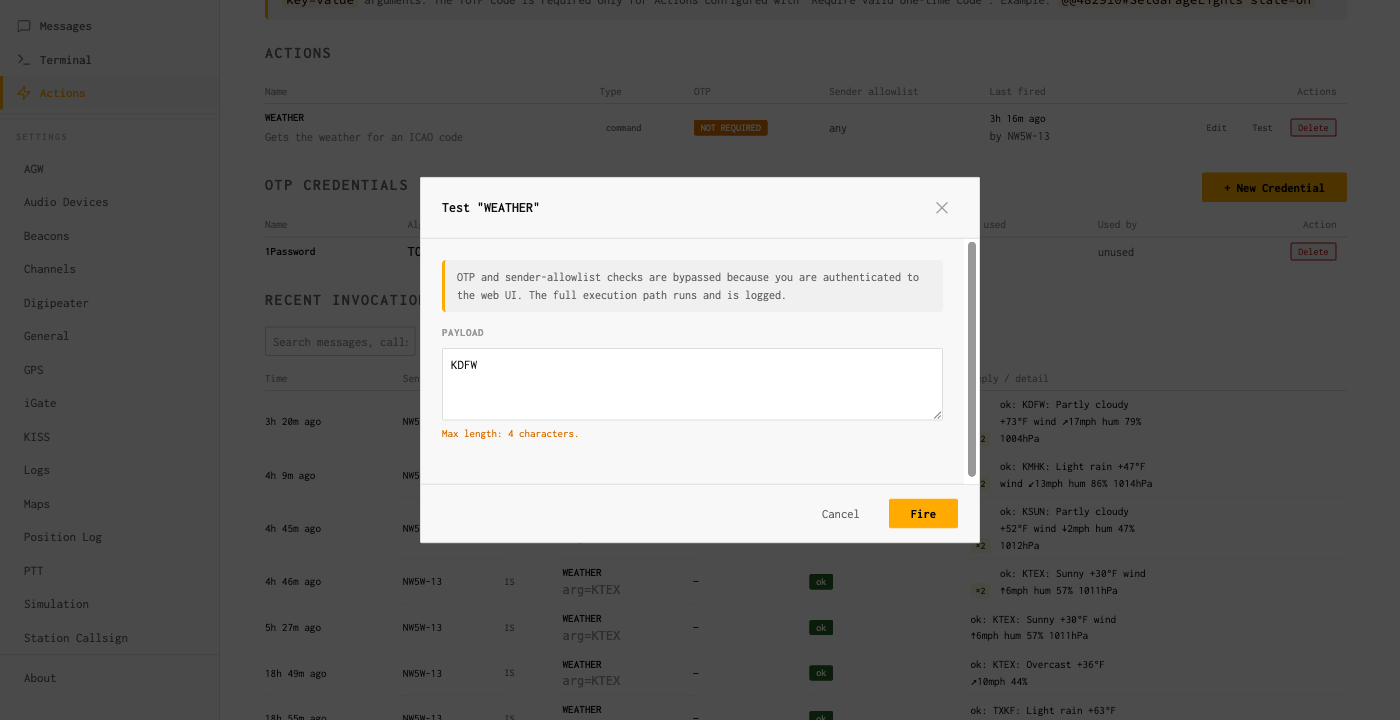
Use the Test button before you go on the air
Each row in the Actions table has a Test button. It opens a dialog that lets you enter values for the Action’s args (one input per schema row) and fire the executor through the same code path as a real invocation. The Test path bypasses OTP and the sender allowlist — you are already authenticated to the web UI — but exercises the full sanitization, executor, and audit-write path. The dialog warns about the bypass in its subhead so you do not conclude an Action is unprotected based on Test results.
Reading invocation rows
-
Status
unknown. Either the Action name is wrong or the wire grammar did not parse. Look at the raw inbound on the Messaging page — remember that an inbound that does not match the@@sentinel goes to the inbox unchanged. -
Status
bad_otp: replay. The exact same code arrived twice within ~90 seconds. Wait for the next code and resend. -
Status
bad_arg: <key>. The wire value did not match the regex configured for that key in the Action’s argument schema. Open the Action, check the row in the schema editor, and either widen the regex or fix the sender’s syntax. -
Status
no_credential. The Action is set Require OTP but its assigned credential row is missing — usually because the credential was deleted in the Credentials table. Re-attach an existing credential or create a new one. -
Status
busyon slow Actions. The per-Action queue is at capacity. Either raise the queue depth, shorten the executor’s runtime, or accept that back-to-back requests will be deferred. -
Status
timeout. The executor took longer thantimeout_sec. Raise the timeout or speed up the underlying command/endpoint. Commands receiveSIGTERMon cancel and have a two-second grace period beforeSIGKILL.
Listener addressees
In addition to your primary callsign and tactical aliases,
graywolf can register extra Actions-only addressees called
listener addressees. A listener addressee widens
the Actions trigger surface so a packet addressed to (say)
GW-CMD with an @@-prefixed body fires
an Action just like one addressed to your primary callsign would.
A packet addressed to a listener that does not
begin with @@ doesn’t fire an Action and also
doesn’t land in your Messaging inbox — the Messaging
router only claims packets addressed to your station call or to
a tactical you’ve enabled, so listener-targeted chatter
without the sentinel falls on the floor. Use listeners when you
want a public command surface without overloading your
station’s primary callsign.
Listener addressees are managed today via the REST API only
(GET / POST / DELETE on
/api/v1/actions/listeners); a UI editor on the
Actions page is on the roadmap but not present yet. See the
REST API reference for the request shape.