
Messaging
SMS-style APRS messaging with DMs, tactical broadcasts, and invites
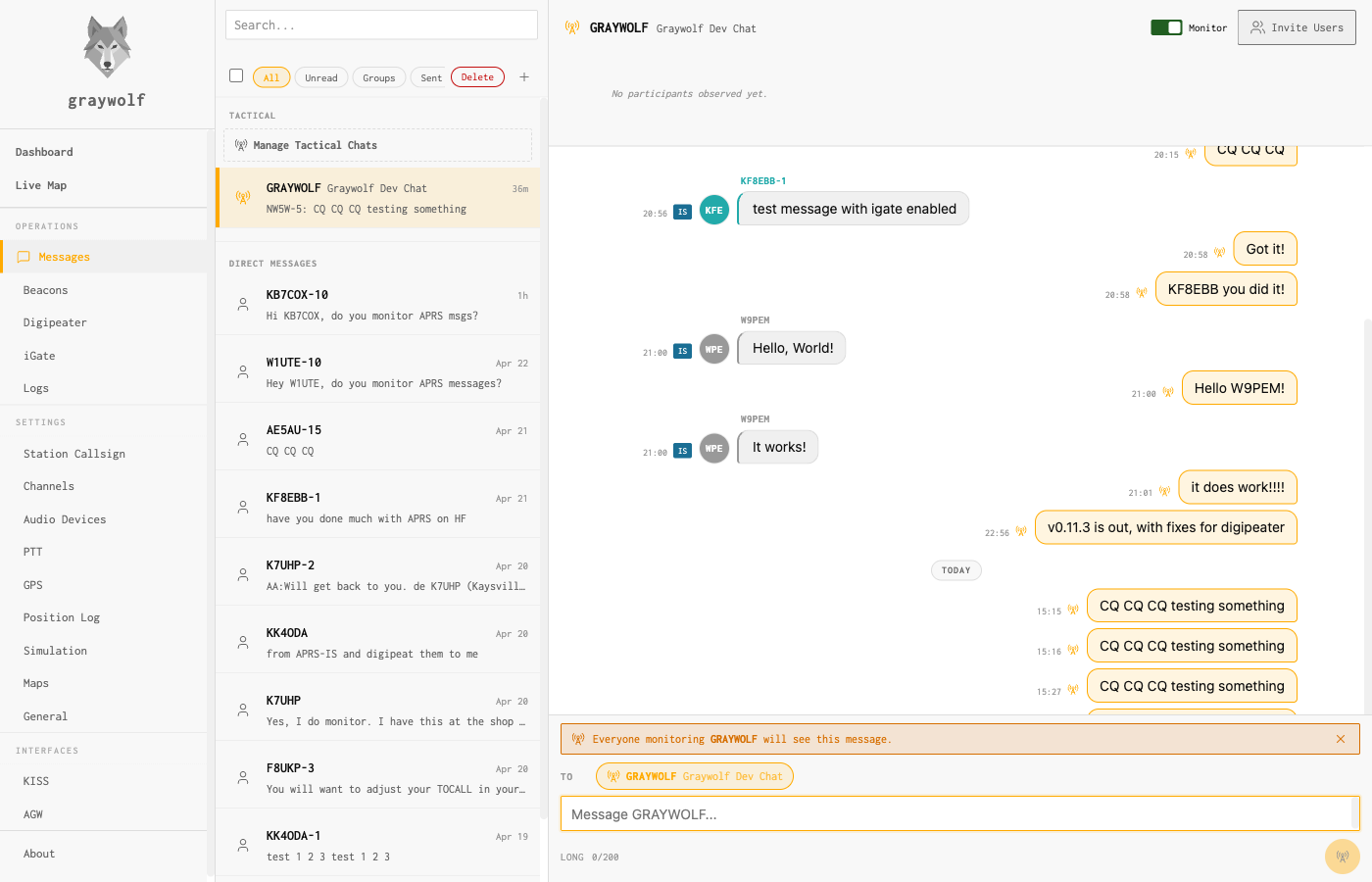
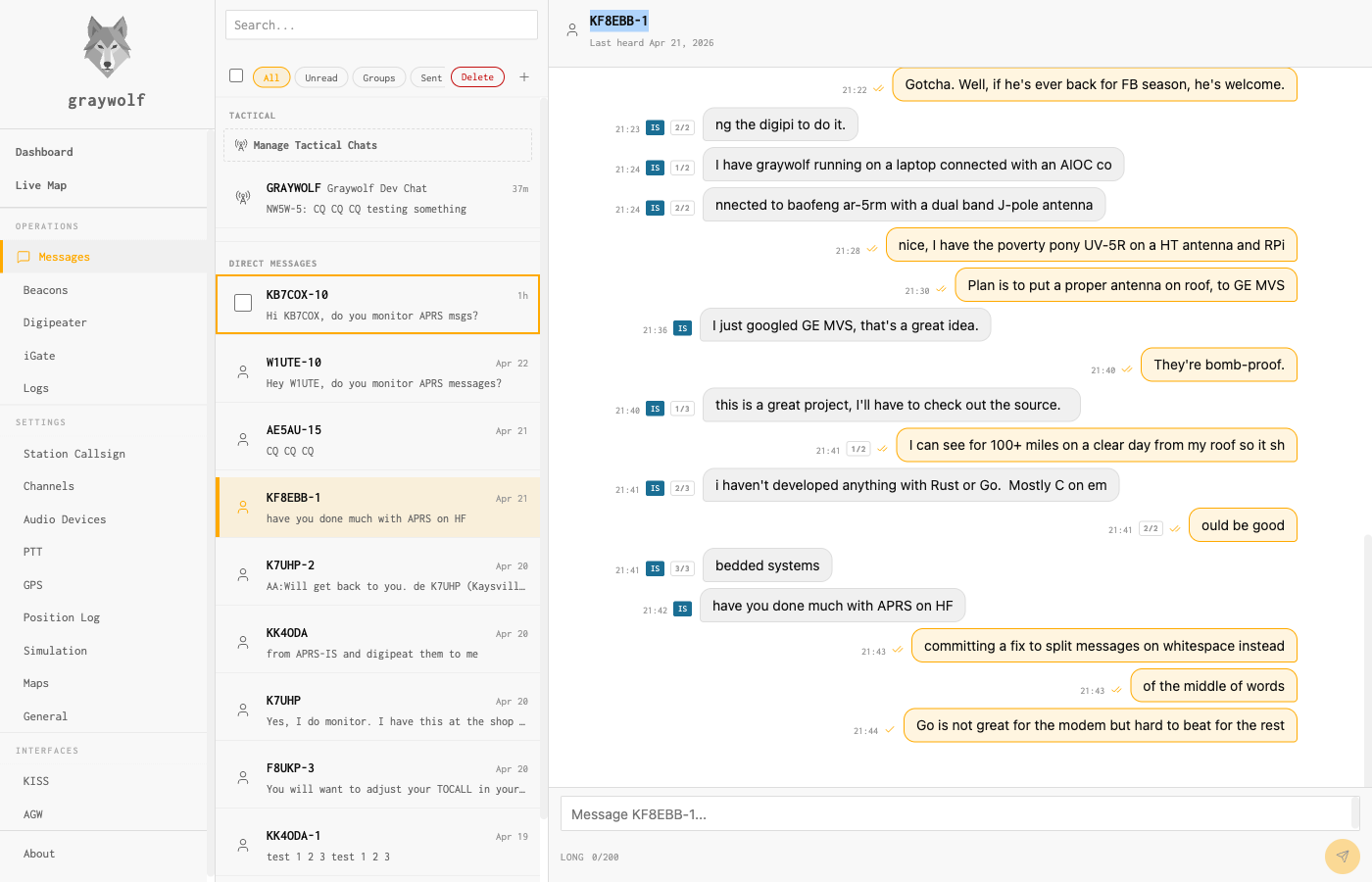
Graywolf’s messaging screen is a chat client that speaks APRS. Every outbound message is transmitted as an APRS11 text packet over RF (with an APRS-IS fallback when the peer is internet-only), and every APRS text frame graywolf hears — whether it came in over the air or arrived through APRS-IS — is shown as a message in the matching conversation. Messages longer than the 67-byte APRS cap are split into numbered segments and reassembled on receive.
APRS-IS only operation. You can run a Messages-only
station with no radio channel: set your station callsign, enable
the iGate, and leave the Channels page empty. Outbound messages
ride APRS-IS via the default Try RF first, fall back to
APRS-IS policy, or set Preferences → Messages →
Send path to APRS-IS only to skip the RF-first attempt.
DM acks delivered over APRS-IS terminate as
awaiting_ack until the peer replies.
The conversation list is always sectioned: Tactical chats first, then Direct Messages. A Manage Tactical Chats button at the top of the list takes you to your tactical subscriptions. Inside any tactical thread, the header carries a Leave Chat button: clicking it stops your station from monitoring the tactical, drops it from the inbox, and updates your APRS-IS subscription so you no longer receive its traffic. The message history is preserved server-side as a read-only archive, so rejoining later picks back up where you left off.
Two kinds of threads
| Kind | Addressing | ACK behavior |
|---|---|---|
| Direct (DM) | One peer callsign | APRS11 auto-ACK and reply-ack, retransmitting until acknowledged or the retry budget runs out |
| Tactical broadcast | A tactical label (e.g. NW5WOPS, SLCARES) |
No ACKs — tactical traffic is one-to-many. Each message is marked simply as transmitted. |
Direct messages
A DM is a normal APRS text packet addressed to a single callsign (optionally with SSID). Graywolf handles acknowledgments, retries, and reply-ack matching automatically. Each outbound message shows whether it’s still waiting for an acknowledgment, was acknowledged, timed out, or was rejected.
The default retry behavior is 4 transmissions total per DM (1
initial plus 3 retries) at 30-second spacing with ±10%
jitter — aligned with Xastir / UI-View32 / APRSdroid norms so
graywolf isn’t noticeably more chatty than other stations
sharing 144.39. Operators who need to tune this can do so via the
REST API
(GET/PUT /api/messages/preferences).
Tactical callsigns
A tactical callsign is a short label operators agree on ahead of an event. Every station that subscribes to the label sees messages addressed to it, and every subscribed station can post as the group. Membership is maintained on each operator’s own machine — nothing tracks it centrally. Graywolf figures out who has been participating by looking at recent traffic on the tactical.
Pick a unique label. Tactical traffic goes out
over RF and reaches APRS-IS, so it’s visible to every
APRS operator in the world. Generic names like NET,
EOC, or TAC collide with every other
net on the planet using the same convention. Prefix the label
with something identifying — your club callsign, a
location code, an event abbreviation — so remote stations
don’t accidentally join your net or see stray traffic
they think is theirs. Good examples: NW5WOPS,
SLCARES, FD2026NE,
UTSKYWRN. Bad examples: NET,
TAC, EOC.
Manage your own subscriptions under Messages → Manage tactical callsigns → (bottom of the conversation list). Each entry has a callsign, an optional friendly alias that only you see (“Main Ops Net,” “Club repeater coord”), and an enable toggle. Monitoring a tactical means its traffic is recorded, shown in the sidebar, and included in unread counts; disabling it hides the thread without forgetting the history.
Inside a tactical thread, sender callsigns are shown as color-coded labels above each message so a fast-moving net is still readable at a glance. The list of participants at the top is populated from recently observed senders.
Inviting stations to a tactical chat
A tactical chat works by convention: if you don’t know the label exists, you can’t subscribe. The Invite Users button in a tactical thread header gives you a way to nudge a remote station to subscribe without coordinating by voice first.
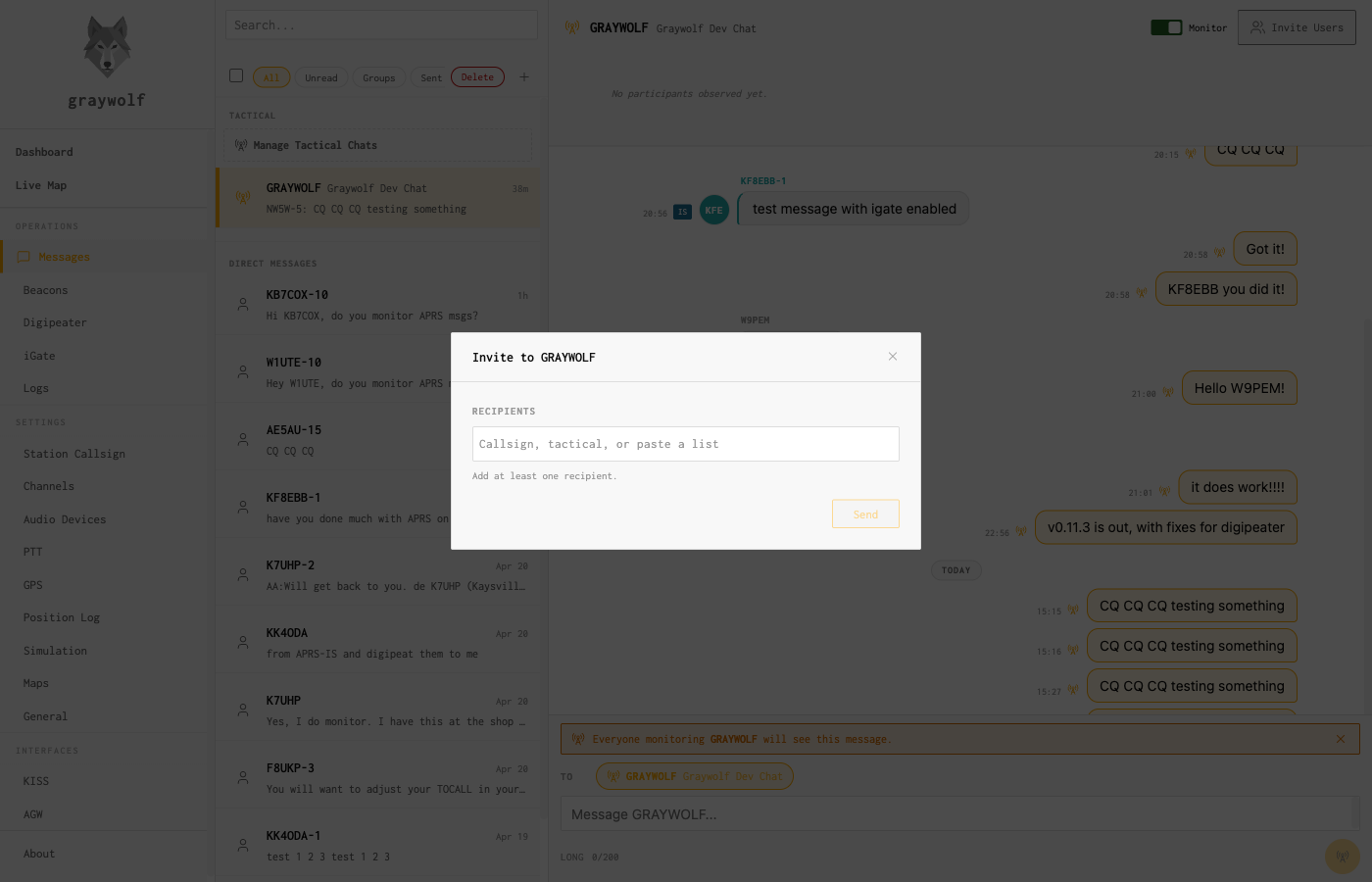
Clicking Invite Users opens a dialog where you add one or more recipients:
- Type a callsign and pick it from the suggestions that appear
- Or paste a comma- or whitespace-separated roster — valid
callsigns are added, invalid tokens stay in the input with a
N added · M invalidhint - Remove a recipient with
×, or delete the last one with Backspace on an empty input
Cmd/Ctrl+Enter sends; plain Enter just focuses the Send button so an accidental keystroke doesn’t fire off a batch of transmissions. Each recipient shows its own progress — waiting to send, sent, or failed with a retry option — updating live as graywolf works through the queue.
Wire format
An invite is a plain APRS11 DM with a strict body:
!GW1 INVITE <TACTICAL>
!GW1 is a version sigil reserved for graywolf protocol
extensions; the anchored regex
^!GW1 INVITE ([A-Z0-9-]{1,9})$ keeps casual messages
like “Invite Bob to the net” from ever matching. A valid
tactical label is 1–9 characters of
[A-Z0-9-]. The full wire body fits in 12–21 bytes,
well under the 67-byte APRS cap.
The invitee’s graywolf installation classifies the inbound
packet and shows an Accept button on the message
instead of raw text. Clicking Accept subscribes the
station to the tactical locally and changes the message to
✓ Joined · Open NW5WOPS →. The
first accept in a session takes you directly into the newly joined
thread.
Ignoring an invite is local-only — there is no server-side
“declined” state, and the invite persists as a normal DM
row.
Stations running other APRS software see the literal
!GW1 INVITE NW5WOPS string and can join manually by
adding the tactical callsign to their client however their client
supports it.
Message transmission settings
Defaults are tuned to match mainstream APRS clients, and most operators never need to change them:
| Setting | Default | Description |
|---|---|---|
| Retry attempts | 4 | Total transmissions on RF per DM (1 initial plus 3 retries). Set to 1 to disable retry. |
| Retry spacing | 30 seconds | Time between retries. A single value means constant spacing; a list of values defines a ladder. |
| APRS-IS fallback | on | Fall back to APRS-IS when the peer is marked internet-only or RF retries are exhausted. |
| Outbound channel | — | Radio channel used for outbound messages. |
These values live in the message_preferences record
and can be read or changed via the
REST API (GET/PUT
/api/messages/preferences). A dedicated settings page is
not shipped today.
Long messages
The APRS spec caps a message body at 67 bytes. Graywolf enforces that limit by default. If you know your contacts are running clients that accept longer messages, flip Allow long APRS messages on the Preferences page — that lets you send up to 200 characters in one message. Stations on stricter clients may truncate or drop anything past 67 bytes, so leave it off unless you’ve confirmed it works on both ends.
Firing remote Actions from a thread
DM threads show a zap icon (⚡) in
the thread header. Tapping it opens the
Remote Actions drawer: a
side-panel for firing operator-curated
@@<otp>#<action> macros at the remote
station whose callsign owns the thread. Inbound replies that
arrive within 60 seconds of an outbound fire and start with a
status keyword (ok, error,
bad_otp, ...) get a small zap badge in the bubble
footer so you can correlate the reply with what you sent. The
icon is omitted on tactical (multi-recipient) threads, where an
OTP-protected fire to many callsigns at once would be a footgun.
Edge cases
-
Split messages. DMs over 67 bytes are split
into numbered segments (
{1/2},{2/2}) and reassembled on receive. The received message shows the joined text. - Duplicate inbound. Packets arriving twice within the dedup window (same sender, same msgid, same text hash) persist once. This applies to invites too.
- Self-addressed DM. Graywolf refuses to send a DM to your own callsign. The invite dialog also rejects your own callsign when you add it as a recipient.
- Invite to an already-enabled tactical. Accept is safe to press more than once. If you’re already subscribed, graywolf says so (“Already a member”) instead of showing the usual join notification.