
Push-to-Talk
Control radio keying and channel access
Push-to-talk (PTT) configuration tells graywolf how to key your radio
for transmission. Each radio channel has
its own PTT configuration. If a channel has no output device or PTT
method set to none, it operates in receive-only mode.
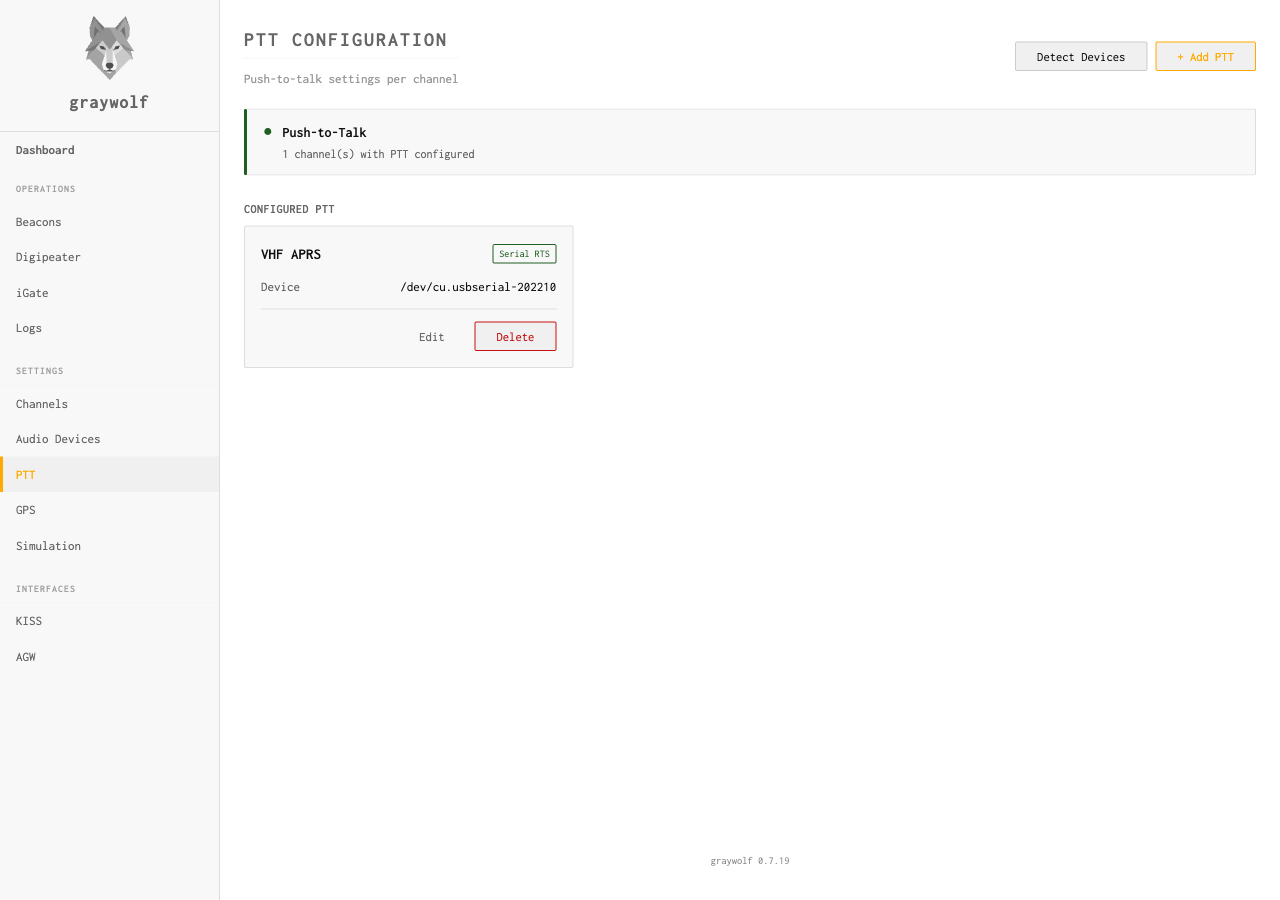
Detect Devices
Click Detect Devices at the top of the page and
graywolf scans your hardware: USB audio adapters with CM108 PTT,
/dev/gpiochip* nodes on Linux, USB-serial ports, and so
on. Two lists come back:
- Recommended for PTT — the best match for
your hardware (e.g. an AIOC or Digirig adapter showing as
cm108 on
/dev/hidraw1). Click it to pre-fill the form. - Other Detected Devices — everything else worth showing, with type and path. Pick one only if you know it’s right for your adapter. Some entries carry hints — for example, an AIOC’s serial port is annotated Use /dev/hidraw1 for PTT on this adapter; this serial port is for data — so you don’t accidentally pick the wrong one.
Detection is the fastest way to set up PTT correctly. Use Add PTT manually if your hardware doesn’t enumerate the way you expected.
Entering a device path manually
In the Change Device dialog, choose
Enter a path manually to type a device path instead
of picking a detected card. This is the reliable way to pin PTT to a
stable udev name — e.g.
/dev/aioc-aprs-ptt created by a rule like
SUBSYSTEM=="hidraw", ATTRS{idVendor}=="1209", SYMLINK+="aioc-aprs-ptt"
— so re-plugging the adapter (which can renumber
/dev/hidraw* or /dev/ttyACM*) never breaks
keying.
graywolf checks whether the path is present as you type and shows a
hint, but it never blocks you from saving: a udev symlink
is allowed to be absent when you save and appear later on plug-in.
Whatever path you enter is used verbatim by the modem, exactly as if
it had been detected.
PTT Methods
| Method | Description | Typical Hardware |
|---|---|---|
none |
No PTT control (receive only) | — |
vox |
No PTT wire — the radio keys on transmit audio. graywolf sends a 500 ms lead-in tone before each packet so the VOX circuit engages first (see VOX PTT below) | Any radio with a VOX setting |
digirig_tone |
No PTT wire — the Digirig Lite keys the radio from a tone on the right audio channel while the packet plays on the left (see Digirig Lite Tone PTT below) | Digirig Lite |
serial_rts |
Assert RTS pin on a serial port | USB-to-serial adapter, Digirig |
serial_dtr |
Assert DTR pin on a serial port | USB-to-serial adapter |
gpio |
Linux GPIO pin via gpiochip character device | Raspberry Pi GPIO header |
cm108 |
USB HID GPIO on CM108/CM119 audio codec | USB sound cards with built-in PTT |
rigctld |
Hamlib rigctld over TCP (CAT control) | Any rig supported by hamlib |
PTT Settings
| Field | Default | Description |
|---|---|---|
method |
none |
PTT control method (see table above) |
device |
— | Serial device path (e.g., /dev/ttyUSB0), CM108 hidraw node, or gpiochip device (e.g., /dev/gpiochip0) |
gpio_line |
0 |
GPIO line offset on the selected gpiochip for the gpio method. 0-indexed, matches the kernel’s line numbering shown by gpioinfo. |
gpio_pin |
3 |
CM108 HID GPIO pin number for the cm108 method. 1-indexed (1–4 on CM108/CM108B, 1–8 on CM119). Not used by the gpio method. |
invert |
false |
Reverse PTT polarity (for backwards-wired rigs) |
VOX PTT
VOX (Voice-Operated Switch) keys the radio from the transmit audio
itself, with no control wire. Select the vox method when
your radio's VOX is enabled and you have no serial, GPIO, CM108, or
CAT keying line available. No device path is required.
A VOX circuit takes a moment to close its transmit relay once it hears audio. Without a head start, the beginning of the packet — the part the receiver needs to lock onto — goes out before the radio is actually transmitting and gets clipped. To prevent that, graywolf plays a steady 500 ms lead-in tone at the channel's mark frequency immediately before every packet, giving the VOX time to engage so the full frame makes it onto the air.
Set your radio's VOX sensitivity high enough that the lead-in
tone reliably keys it, and keep VOX delay/hang short enough that
the radio doesn't drop out between back-to-back packets. Both
vox and none leave the radio's PTT wire
untouched; the difference is that only vox sends the
lead-in tone. Use vox whenever a VOX-keyed radio is
clipping the start of your packets.
SignaLink USB users: this is your PTT method. The
SignaLink USB has no serial port — it presents only a USB
sound card and keys the radio with its own internal VOX circuit.
It will therefore never appear in the serial_rts or
serial_dtr device list. Select vox, leave
the PTT device unset, and set the SignaLink's front-panel
DLY (delay) knob short enough that it releases between
packets. Graywolf's 500 ms lead-in tone drives the SignaLink's
VOX directly, so no radio-side VOX setting is required.
Digirig Lite Tone PTT
The Digirig Lite has no serial or
HID control line for PTT. Instead, its onboard detector keys the radio
whenever it hears an audio tone on the right channel,
while the AFSK packet audio travels on the left channel.
Select the digirig_tone method to use it. No device path is
required, but the channel's audio output must be routed to the
Left channel of the stereo Digirig Lite device.
For every packet, graywolf emits a steady keying tone at the channel's mark frequency on the right channel for the full transmission, and prepends a 500 ms silent lead-in on the left (AFSK) channel so the tone starts slightly before the packet. That head start lets the Digirig's detector and the radio's transmit switch engage before any data goes out, so the start of the frame is not clipped. The keying tone rides its own channel and never mixes with the packet audio.
Digirig Lite Tone PTT requires a stereo (2-channel) output device;
on a mono device the keying tone is suppressed (it would otherwise
corrupt the packet). Like vox and none, it
leaves the radio's PTT wire untouched — the tone does the
keying.
On Android
The Android app offers this as “Digirig Lite (tone PTT)” in the channel's PTT method picker. No device needs to be selected: the app auto-routes audio to the connected USB sound device and drives the keying tone itself. Unlike the desktop, there is no output-channel selector — the mapping is fixed to the Digirig Lite wiring, with the AFSK packet on the left channel and the keying tone on the right. The same 500 ms silent lead-in applies so the radio keys before the packet starts.
The Digirig Lite must connect as the phone's USB audio output (it carries no PTT data line). The app runs the output in stereo so the tone can ride the right channel; if the USB device only negotiates mono, the tone cannot be separated and the radio will not key.
Serial PTT
Serial RTS or DTR is the most common PTT method. The modem asserts the chosen pin when transmitting and de-asserts it when done. Many USB interfaces use this approach, including the Digirig Mobile and plain FTDI / CP210x / CH340 USB-serial cables. The SignaLink USB is not one of them — it has no serial port and keys the radio with its own VOX circuit (see VOX PTT).
# Find your serial device
ls /dev/ttyUSB* /dev/ttyACM*
The graywolf user must have permission to access the serial device.
Adding the user to the dialout group (Linux) handles
this. The systemd service file includes this group by default.
GPIO PTT (Raspberry Pi)
GPIO PTT is Linux-only. It targets single-board
computers with exposed GPIO headers — Raspberry Pi, BeagleBone,
and similar — where you can wire a GPIO line directly to your
radio’s PTT input. On non-Linux hosts the gpio
method is hidden from the method dropdown and the backend returns
gpio ptt is only supported on Linux if forced via API.
Graywolf uses the chardev v2 API (/dev/gpiochipN). The
legacy sysfs interface (/sys/class/gpio) is deprecated
and not supported.
In the PTT dialog, select gpio, then pick the gpiochip
device from the auto-detected list (typically /dev/gpiochip0
on a Pi). The UI then calls
/api/ptt/gpio-lines and populates a line selector with
the lines reported by the chip. Each entry shows the offset and the
kernel’s line name (for example, Line 14 — TXD1).
Lines already claimed by another kernel driver — SPI, I2C,
UART, and so on — are annotated [in use: <consumer>]
in the label and are rejected by the form before submit with a message
like Line 2 is claimed by i2c-bcm2835. Pick another line.
When GPIO PTT is active, the consumer label graywolf-ptt
shows up in gpioinfo output so you can confirm which
process is holding the line. Graywolf drives the line low before
releasing it, so the PTT input is left inactive when graywolf stops
or the channel is reconfigured.
If you run graywolf on a Linux host where no gpiochip devices are
available — for example, inside a container without a bind mount
for /dev/gpiochip*, or as a user without read/write
access — the GPIO method stays visible in the dropdown but the
line selector reports No GPIO chips detected. Check that you
have access to /dev/gpiochip* (typically the ‘gpio’ group
on Raspberry Pi OS).
Linux permissions: the graywolf user must have
read/write access to /dev/gpiochipN — typically
the gpio group on Raspberry Pi OS, or
plugdev on other distros. If a line open fails with
permission denied, add the user to the appropriate
group and re-login (or reboot):
sudo usermod -aG gpio $USERGPIO pins output 3.3V. If your radio requires a different voltage or current, use a transistor or optocoupler circuit to interface the GPIO pin with your radio’s PTT line.
CM108 PTT (USB HID GPIO)
CM108-family USB audio codecs (C-Media CM108, CM108AH, CM108B, CM109, CM119) expose a HID interface alongside audio that can toggle GPIO pins for PTT. This is the method used by Digirig, AIOC, and many homebrew adapters that combine a USB sound card with PTT on a single device.
Select the cm108 method and choose the detected hidraw
device. The GPIO pin selector is annotated for you: pin 3 (the
default) is the most common, pin 2 is unavailable on CM108AH/B, and
pins 5–8 only exist on CM109/CM119.
| Device | VID:PID | Notes |
|---|---|---|
| CM108 / CM108AH / CM108B | 0d8c:* | Generic C-Media, Digirig |
| CM109 / CM119 / CM119A | 0d8c:* | Extended GPIO (1–8) |
| AIOC (All-In-One-Cable) | 1209:7388 | STM32-based CM108 emulation |
Linux permissions: The /dev/hidraw*
devices are typically root-only. Graywolf ships a udev rule
(99-graywolf-cm108.rules) that grants access to the
plugdev group for CM108-compatible devices. The systemd
service includes this group by default. If you installed manually,
add your user to the plugdev group and reload udev
rules:
sudo usermod -aG plugdev $USER
sudo udevadm control --reload-rules
sudo udevadm triggerUSB audio latency: USB sound cards add audio latency (typically 5–20 ms). If the beginning of your transmissions is clipped, increase TX Delay to compensate.
macOS: CM108 HID GPIO PTT is supported on macOS via the IOKit HID interface. Device enumeration and GPIO control work the same as on Linux and Windows. Unlike Linux, there is no automatic audio–HID correlation — select the correct device from the list manually.
CSMA Channel Access
CSMA (Carrier Sense Multiple Access) prevents graywolf from transmitting while another station is on the air. The TX governor checks the DCD (Data Carrier Detect) state before keying.
| Field | Default | Description |
|---|---|---|
slot_time_ms |
10 |
Time slot duration for p-persistence algorithm |
persist |
63 |
Persistence value (0–255). Higher = more aggressive |
dwait_ms |
0 |
Dwell/backoff time after DCD clears |
The p-persistence algorithm works as follows: when the channel is
clear (DCD inactive), graywolf generates a random number 0–255.
If it’s less than persist, it transmits immediately.
Otherwise, it waits one slot_time_ms and tries again.
TX Rate Limiting
The TX governor enforces per-channel rate limits to prevent excessive transmissions. Configure these through the TX timing API:
rate_1min |
Maximum packets per minute (0 = unlimited) |
rate_5min |
Maximum packets per 5 minutes (0 = unlimited) |
full_dup |
Skip CSMA entirely (for full-duplex setups) |