
Radio Channels
Configure modem type, frequencies, and demodulator settings
A radio channel is one RF path — typically one radio on one frequency. Graywolf can run several at once on different audio devices, so you can monitor (and transmit on) VHF and UHF in parallel.
Channel Type
When you click + Add Channel, pick the channel type first. The rest of the form changes based on what you choose.
| Modem-backed | The normal case: graywolf does the modulating and demodulating itself against an audio device. Use this for any channel where graywolf talks to the radio directly. |
| KISS-TNC only | No audio device, no software modem. Frames come and go through a KISS interface backed by an external TNC, an attached LoRa modem, or a remote KISS server. See KISS Interfaces and Remote KISS TNC. |
Each channel on the list tells you what’s driving it under BACKING: Modem · Live when graywolf itself is doing the modulation, or TNC / KISS client when frames are coming and going through a KISS interface.
For channels that transmit through the modem, a PTT block also appears on the card showing how graywolf is keying the radio — CM108, GPIO, Serial RTS, Serial DTR, or rigctld — with a short detail such as the GPIO pin number, gpiochip line, or serial device path. Not configured means the channel can transmit electrically but has no PTT method assigned yet on the PTT page; outgoing frames will be dropped until you set one. Receive-only channels and KISS-TNC channels don’t show this block: KISS interfaces handle their own keying, and an RX-only channel never transmits.
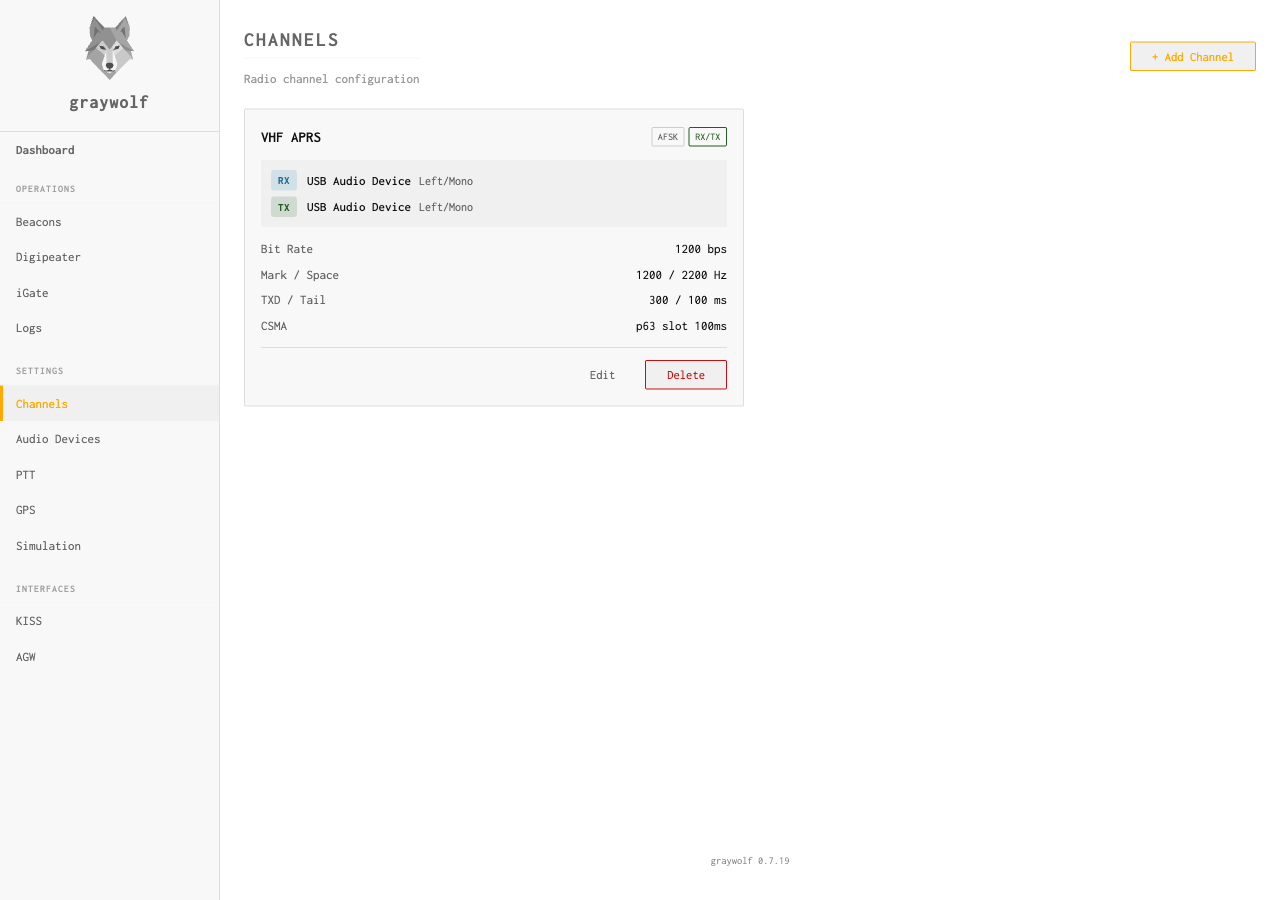
Channel Settings
| Field | Default | Description |
|---|---|---|
name |
— | Display name (e.g., “VHF 144.39”) |
input_device_id |
— | Audio input device (required) |
input_channel |
0 |
Audio channel: 0 = left/mono, 1 = right |
output_device_id |
0 |
Audio output device. Pick None (RX only) for a receive-only channel. |
output_channel |
0 |
Output audio channel: 0 = left/mono, 1 = right |
Modem Types
Graywolf’s software modem offers four modulation types. Pick the one that matches the radio you’re plugging into.
| AFSK | Audio FSK (Bell 202). Standard 1200 baud APRS on VHF — what you want for 144.39 MHz / 144.80 MHz. |
| GFSK | Gaussian FSK at 9600 baud (G3RUH-style). Needs a radio with a discriminator output (flat audio, no de-emphasis). |
| PSK | Phase-shift keying for experimental packet modes. |
| FSK | Plain frequency-shift keying. Pick this if you know the radio and slot you’re using already. |
AFSK 1200 baud (Bell 202) is the standard APRS modulation used on VHF. This is what you want for 144.39 MHz (North America) or 144.80 MHz (Europe).
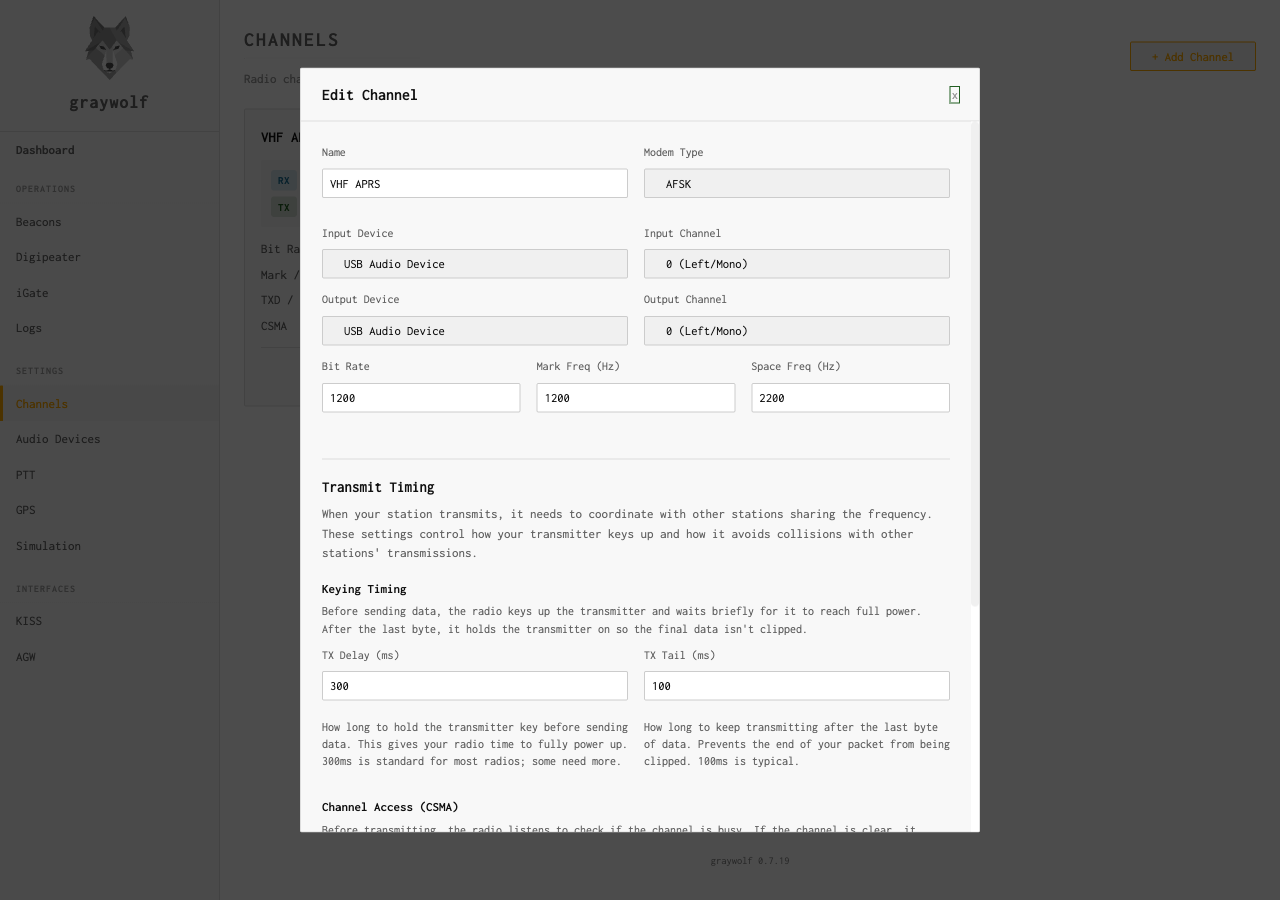
| Field | Default | Description |
|---|---|---|
modem_type |
afsk |
AFSK modulation |
bit_rate |
1200 |
Baud rate |
mark_freq |
1200 |
Mark frequency in Hz |
space_freq |
2200 |
Space frequency in Hz |
profile |
A |
Demodulator profile (see below) |
num_slicers |
1 |
Parallel decision thresholds (1, 2, 4, or 8) |
fix_bits |
none |
Bit-flip retry: none, single, or double |
Demodulator Profiles
Graywolf offers two demodulator profiles, matching Dire Wolf’s decoders:
| Profile A default | Dual local-oscillator mixing with root-raised-cosine filtering and AGC. Best general-purpose decoder for most radio setups. |
| Profile B | FM discriminator with phase-rate measurement. Better for receivers with flat audio output (no de-emphasis). |
Multi-Slicer
Increasing num_slicers runs multiple parallel decision
thresholds on the same audio stream. This can recover packets that
a single threshold would miss due to noise or signal variation.
Higher values use more CPU.
A good starting point for a busy channel is
num_slicers: 4. On a Raspberry Pi, keep this at
1 or 2 to stay within CPU budget.
GFSK at 9600 baud (G3RUH-style direct FSK) for high-speed packet. Requires a radio with a discriminator output.
modem_type | gfsk |
bit_rate | 9600 |
PSK (Phase Shift Keying) support is available for experimental packet radio modes.
modem_type | psk |
Forward Error Correction
Graywolf can encode transmitted packets with forward error correction. FEC-encoded packets are always decoded on receive regardless of these settings — these flags only affect transmission.
fx25_encode |
Enable FX.25 (interleaved convolutional code, MIL-STD-188-165) on transmit |
il2p_encode |
Enable IL2P (Improved Layer 2 Protocol) on transmit |
FX.25 and IL2P add redundancy that can recover packets with bit errors, improving reliability on noisy channels. The receiver automatically detects and decodes FEC-encoded frames regardless of these transmit settings.
TX Timing
| Field | Default | Description |
|---|---|---|
tx_delay_ms |
300 |
Milliseconds of preamble flags before data |
tx_tail_ms |
100 |
Milliseconds of trailing flags after data |
tx_delay_ms gives the radio time to key up and stabilize
before data is sent. Most radios need 200–500 ms. Too short and
the beginning of your packet will be lost; too long wastes airtime.