
iGate
Bridge RF packets to and from the APRS Internet System
An iGate (Internet Gateway) connects your local RF APRS network to the worldwide APRS-IS (APRS Internet System). Graywolf supports bidirectional gating — forwarding packets from RF to the internet and from the internet back to RF.
Running APRS-IS only (no radio)? You don't need a radio channel to send and receive APRS Messages. Set your station callsign, enable the iGate, and skip the Channels page. On the Preferences page, set Messages → Send path to APRS-IS only if you want graywolf to skip the RF-first attempt.
RF → APRS-IS (Connection)
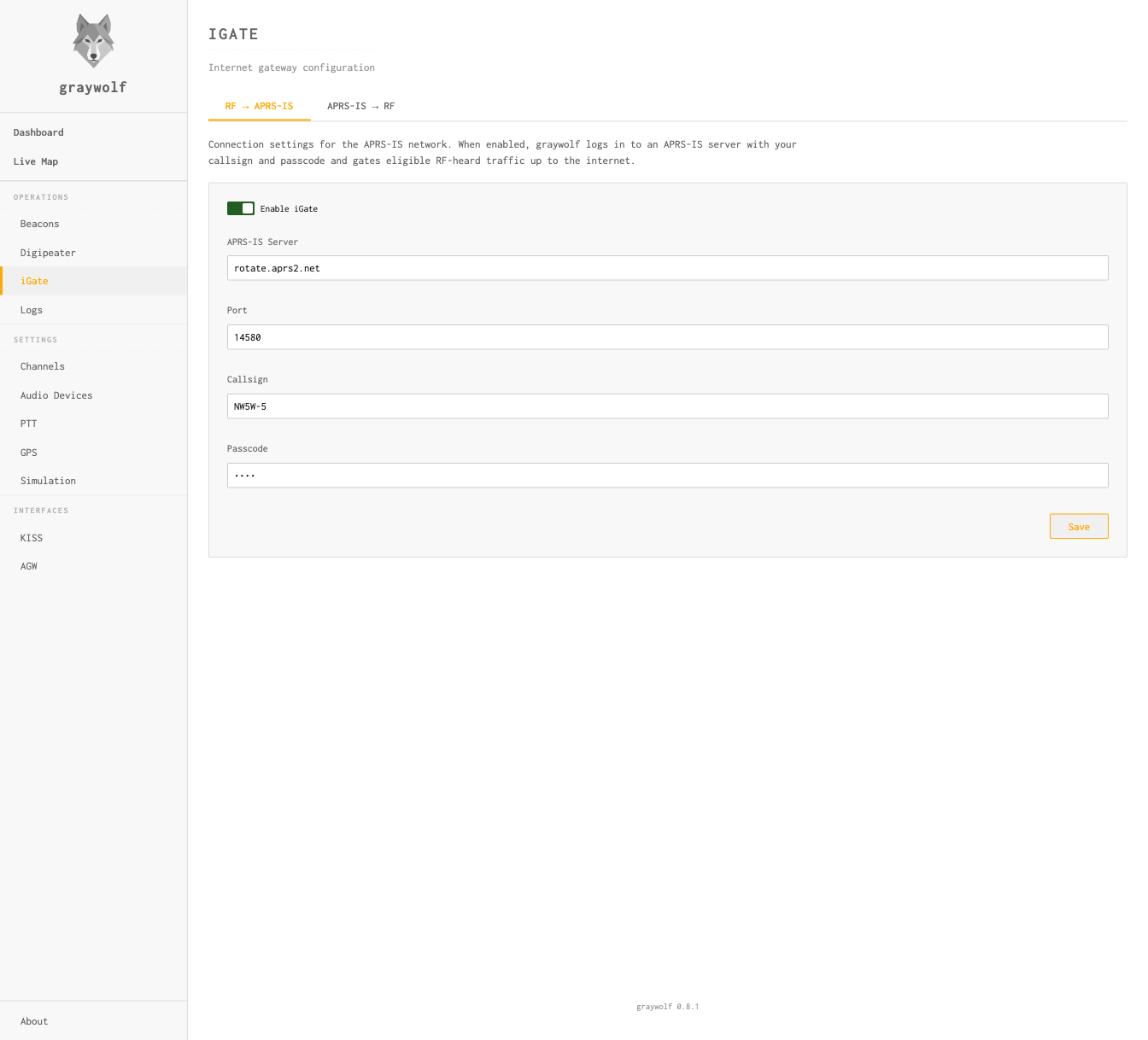
The first tab configures the APRS-IS connection used for both directions. When enabled, graywolf connects to an APRS-IS server and gates eligible RF-heard traffic up to the internet.
| Field | Default | Description |
|---|---|---|
| Enable iGate | Off | Master switch for the iGate |
| APRS-IS Server | rotate.aprs2.net (shown as Worldwide) |
Select the Tier-2 regional rotate address nearest your station, or leave it on Worldwide to use the global rotation. Select Custom to enter another APRS-IS hostname. |
| Port | 14580 |
APRS-IS server port. 14580 is the client-defined
filter port that aprs2.net
asks all users to connect to; you should not need to change it.
|
| Callsign | — | Login callsign (e.g., N0CALL-5) |
| Passcode | — | Computed automatically from your station callsign. Set the callsign on the Callsign page; graywolf derives the passcode at startup. A station callsign of N0CALL (the unset sentinel) yields the read-only passcode -1, which disables APRS-IS transmits. |
Choosing an APRS-IS server. Pick the regional address for where your station is:
- North America —
noam.aprs2.net - South America —
soam.aprs2.net - Europe & Africa —
euro.aprs2.net - Asia —
asia.aprs2.net - Oceania —
aunz.aprs2.net
Each regional address rotates among Tier 2 servers in that part of
the world, and these are the addresses
aprs2.net asks clients to use.
Worldwide (rotate.aprs2.net) can hand
you a server on the other side of the world, adding latency to every
packet you gate. graywolf only defaults to Worldwide because it
can't tell which region a new install is in.
graywolf computes the APRS-IS passcode from your station callsign at
startup; you do not enter it manually. To run a receive-only station
that listens to APRS-IS without contributing, leave the station
callsign as N0CALL or disable the iGate entirely.
APRS-IS → RF
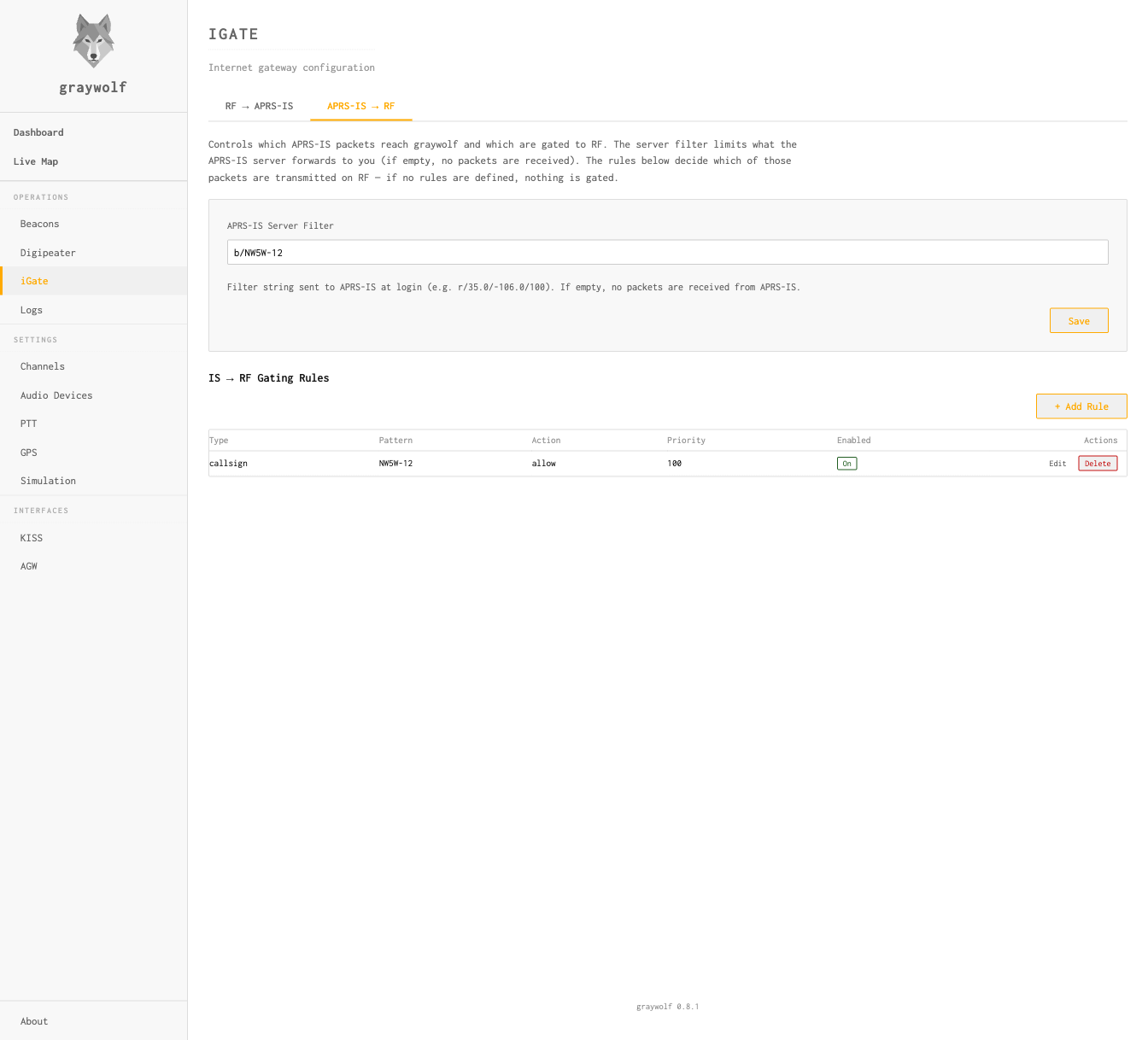
The second tab controls what you receive from APRS-IS and what gets gated to RF. There are two layers of filtering:
- Server filter — a coarse, network-level filter
sent to the APRS-IS server at login. It controls what traffic the server
forwards to you, reducing bandwidth. Uses
APRS-IS filter syntax
(e.g.,
r/35.0/-106.0/100for a 100 km radius,b/NW5W-12for a single station). If left empty, no packets are received from APRS-IS. - IS→RF gating rules — fine-grained, local rules that decide which received packets are actually transmitted on RF. If no rules are defined, nothing is gated.
Both layers are needed because APRS-IS filter syntax cannot express
everything the gating rules can. For example, there is no server-side
filter for “messages addressed to a specific callsign” —
you would need to pull all messages (t/m) and filter locally
with a Message Dest rule.
Spec-Mandated IS→RF Policy
Before your gating rules are consulted, every packet arriving from APRS-IS passes through a spec-mandated policy gate. The gate has two branches depending on packet type:
- Directed messages — forwarded only when
the addressee has been heard directly on RF (no digipeater
repeat) within the last 30 minutes. This is the APRS iGate
specification: remote-origin messages only reach RF when
there’s a realistic chance the local recipient will hear
them. Bulletins (
BLN*) and NWS broadcasts are never gated. - Non-message traffic (positions, weather,
telemetry, status) — forwarded only when the packet’s
source shares your iGate’s base callsign but is not
your iGate’s exact callsign. So an iGate running as
N0CALL-10can echoN0CALL-7(e.g. a family tracker or internet-fed weather station) onto local RF, but packets from strangers and self-echoes fromN0CALL-10itself are dropped.
Packets that fail the policy gate never reach your gating rules. Packets that pass still have to be allowed by a gating rule to actually transmit — the gating rules are the narrower layer. Every packet that does transmit is wrapped in APRS third-party format so other iGates and applications can see it originated on the internet side (this prevents re-gating loops).
Loop prevention applies to both branches: if your callsign already appears in the packet’s RF path, the packet has already transited your station and will not be re-transmitted.
APRS-IS Server Filter
The APRS-IS Server Filter field is the filter string sent to the APRS-IS server at login. If left empty, no packets are received. Separate clauses with spaces.
You don’t need to add g/ clauses for your
tactical chats — graywolf appends one automatically for
every enabled tactical callsign so APRS-IS forwards traffic
addressed to those tacticals. Manage tacticals from the
Messages page.
IS → RF Gating Rules
Rules are evaluated in Priority order (lower = first). The first matching rule decides whether the packet is allowed or denied. If no rule matches, the packet is denied.
| Field | Description |
|---|---|
| Type | Match type: Callsign, Prefix, Message Dest, Object, or Packet Type |
| Pattern | Value to match against (e.g., NW5W-12, W5) |
| Action | Allow or Deny |
| Priority | Evaluation order (lower = evaluated first) |
IS→RF gating transmits on the air. Only enable this if you have a valid amateur radio license, proper PTT and channel configuration, and understand the impact on your local APRS channel. A misconfigured IS→RF gate can flood a busy frequency. Always test new rules in simulation mode before going live, and pair narrow gating rules with a tight APRS-IS Server Filter so the server never even sends you the traffic you don’t want to gate.
Rule Types
Each rule matches on one of four fields. The semantics differ by type
— pay particular attention to where SSIDs are compared literally
vs. stripped, and where the trailing * wildcard is
supported.
Callsign
Exact, case-insensitive match on the full source callsign
including SSID. Pattern NW5W-7 matches only the
source NW5W-7 — not NW5W,
NW5W-1, or any other SSID.
* is not a wildcard character for
Callsign rules. Save will be rejected if your pattern contains
*. Use a Prefix rule instead when you
want to match every SSID of a base callsign.
Prefix
Case-insensitive prefix match on the source’s base
callsign with its SSID stripped. Pattern W5
matches source callsigns W5XYZ, W5XYZ-9,
W5AA-15, and so on. Pattern NW5W matches
NW5W and every SSID of NW5W.
Broad prefixes flood your local RF channel. Short
prefixes like K, W, K5, or
KE match tens of thousands of stations worldwide, and
an Allow rule on such a prefix will gate every one of them that
reaches your APRS-IS server filter. This can saturate your local
APRS frequency within seconds. See the
on-air transmission warning above.
To stay safe:
- Use the most specific prefix possible —
prefer the full base callsign (
NW5W) over a short prefix (NW). - Pair every Prefix rule with a tight APRS-IS Server
Filter (for example
b/NW5W*org/NW5W*) so APRS-IS doesn’t send you the firehose in the first place. - Test the rule in simulation mode and watch the log before enabling RF output.
Common gotcha: putting an SSID into a Prefix
pattern — for example NW5W-7 — silently
never matches anything. The source callsign has
its SSID stripped before comparison, so NW5W-7 in a
Prefix pattern compares against a source like NW5W
and fails on the -7. Use a Callsign
rule for exact SSID matching, or drop the SSID from your Prefix
pattern.
* is not a wildcard character for
Prefix rules — the entire Prefix type is already a prefix
match. Save will be rejected if your pattern contains
*.
Message Dest
Case-insensitive match on the addressee of a message
packet (the station a message is directed to). Plain
patterns like NW5W-7 are an exact match. A pattern
ending in * is a trailing wildcard: the
* matches any suffix of the addressee.
| Pattern | Matches | Does not match |
|---|---|---|
NW5W-7 |
NW5W-7 |
NW5W, NW5W-1 |
NW5W-* |
NW5W-1, NW5W-7, NW5W-15 |
NW5W (no SSID), K5XYZ-7 |
NW5W* |
NW5W, NW5W-7, NW5WX |
K5XYZ |
Broad wildcards flood your local RF channel. A
pattern like B* would match every bulletin
(BLN1, BLNA…) that reaches your
APRS-IS server filter — potentially hundreds of packets per
minute. Keep the static prefix as long and specific as possible,
and pair the rule with a narrow APRS-IS Server
Filter. See the
on-air transmission warning above.
Bare * patterns, empty patterns, and patterns that
trim to just a * are rejected at save as a flooding
guard. * is supported only as a trailing
character — *NW5W or NW*W are
also rejected.
Object
Case-insensitive match on the name of an APRS object or
item. Plain patterns like WX-001 are an exact
match. A pattern ending in * is a trailing wildcard, so
WX-* matches every object name starting with
WX-.
Broad object patterns may catch unrelated objects.
APRS object names are not reserved, so a pattern like
W* will match any object whose name happens to
start with W — including weather, repeater,
and arbitrary user-created objects from other regions. Prefer
the longest specific prefix that still covers the objects you
actually want to gate, and see the
on-air transmission warning above.
Bare * patterns, empty patterns, and *
anywhere other than the final character are rejected at save,
identical to Message Dest.
Packet Type
Match on the type of the APRS packet rather than on
any callsign or name. Instead of a free-text pattern, the Pattern
field becomes a drop-down of packet-type categories mapped to the
standard aprs.is t/… filter classes:
Message, Position,
Weather, Object,
Item, Telemetry,
Status, and Query.
(Position also covers Mic-E reports.) This lets you gate only a
chosen kind of traffic to RF — for example, messages only in
areas where no iGate should transmit anything else on the air.
A weather station’s position report is classified as Weather, not Position — the weather data determines the category. If you want to gate weather stations, use the Weather category; a Position rule will not match them.
Packet Type rules still pass through the hardcoded policy gate: non-message types only transmit when the packet is sourced from one of your own station SSIDs, and directed messages only transmit to a station heard directly on RF in the last 30 minutes. A Packet Type rule narrows what is gated; it never widens who or what the policy gate already allows.
Example: Gate a Single Station
To gate only packets from NW5W-12 to RF, set the
APRS-IS Server Filter to b/NW5W-12 (so APRS-IS only
sends you that station’s packets) and add a gating rule to
allow them through:
APRS-IS Server Filter: b/NW5W-12

Type:     Callsign
Pattern:  NW5W-12
Action:   Allow
Priority: 100
Example: Gate All Messages To Your Callsign
To gate every message addressed to any SSID of NW5W
(for example NW5W, NW5W-1, …,
NW5W-15), use a Message Dest rule with the new trailing
wildcard and pair it with a server filter narrowed to the same base
callsign:
APRS-IS Server Filter: g/NW5W*

Type:     Message Dest
Pattern:  NW5W-*
Action:   Allow
Priority: 100
This pair is safe because both layers narrow to a single
base callsign. The APRS-IS Server Filter
(g/NW5W*) tells the server to forward only messages
whose addressee starts with NW5W, so the firehose
never reaches graywolf. The gating rule then gates those messages
to RF. Neither layer alone would be safe: without the server
filter, graywolf would still receive (and evaluate) every message
on APRS-IS; without the gating rule, graywolf would receive those
messages but never transmit them.
Example: Gate Messages Only
To transmit only messages to RF and nothing else,
add a single Packet Type rule. The default-deny policy handles the
rest: any packet that isn’t a message falls through to deny.
Pair it with a t/m server filter so APRS-IS only sends
you message traffic in the first place:
APRS-IS Server Filter: t/m

Type:     Packet Type
Pattern:  Message
Action:   Allow
Priority: 100
This is the recommended setup for service areas where an iGate should relay directed messages to local stations but must never put position, weather, object, or telemetry traffic on the air. The heard-direct check still applies, so a message only transmits when its addressee was recently heard directly on RF.
Simulation Mode
Simulation mode lets you test your iGate configuration without actually
connecting to APRS-IS or transmitting. Packets that would be gated are
logged instead. Toggle it via POST /api/igate/simulation
or the web UI.
Use simulation mode when first setting up your iGate to verify that filters are working as expected before going live.
Automatic Behaviors
The iGate automatically handles several edge cases:
- Third-party suppression — packets that
originated from APRS-IS (third-party format) or carry a
TCPIP/TCPXX/NOGATE/RFONLYpath marker are not gated RF→IS - Local-message suppression — messages you originated on RF are not re-gated to APRS-IS if a digipeater repeats them back to you
- No client-side RF→IS deduplication — graywolf does not drop “duplicate” RF packets before sending to APRS-IS. The APRS-IS network does content-aware dedup server-side and benefits from seeing duplicates for path analysis, per aprsc’s IGATE-HINTS.
- Third-party wrapping — every IS→RF
frame is wrapped in APRS third-party format (APRS101 §20)
so other iGates can see the packet originated on the internet
side. The outer frame’s digipeater path comes from the
IS→RF Digipeater Path setting (the
Direwolf
IGTXVIAequivalent): leave it empty to transmit direct — only stations in direct RF range hear the packet — or set a literal path such asWIDE1-1,WIDE2-1when your recipients sit behind a digipeater (a common asymmetric-RF situation) - Reconnection — the APRS-IS connection
is automatically re-established if it drops, with DNS
re-resolved on every attempt so hostnames like
rotate.aprs2.netload-balance correctly